How Pelota works
From the download to the group chat, this is what a tracked match actually looks like — nine steps, and your iPhone stays out of your hands from the first serve to the last point.
Step 1
Install Pelota on your iPhone
Pelota is a free download from the App Store and runs on any iPhone with iOS 18.0 or later. The watch app travels in the same download, so there is nothing else to hunt for.
Step 2
Open it on your Apple Watch
A moment after the iPhone install finishes, Pelota appears on your Apple Watch, which needs watchOS 10 or later. The watch is where matches live: everything that happens on court happens there, and the iPhone is for afterwards.
Step 3
Pick your sport and your format
Choose padel or tennis, then set the match up the way your club plays it: golden point or advantage, a star point, the number of sets. You choose once at the start and the scoreboard follows those rules to the end.
Step 4
Prop your iPhone where it can see the court
If you want video, stand your iPhone somewhere with a view of the court — against the back glass is ideal, and a bench, the fence or the top of your bag all work. That is the whole filming setup, it is optional, and the clips that come out of it are part of Pelota Pro.

Step 5
Start the match from your wrist
Raise your wrist, tap start, and you are playing. Pelota opens a workout at the same moment, so your heart rate and your effort are recorded from the first point rather than from whenever you remembered to press something.
Step 6
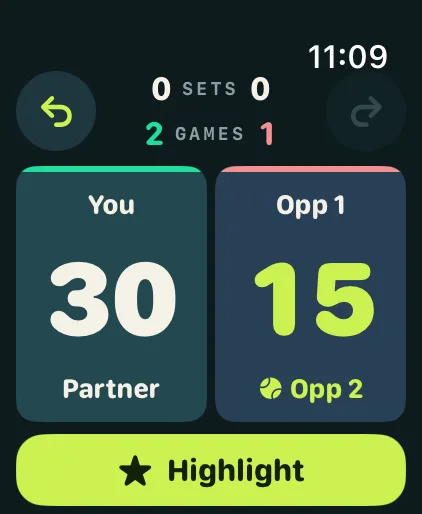
Score each point on the watch
One tap per point, and a haptic tap back confirms it landed. When you want the detail behind the score, mark the point as a winner, an unforced error or an ace from the same screen — all of it from your wrist, without picking anything up.

Step 7
Keep the moments worth keeping
While your iPhone is filming, the points that decide the match save themselves — a break point you convert, a set point, a match point, a golden point. For anything else worth keeping, an impossible defence or a smash you want to see again, show your palm to the camera or tap Highlight on the watch and that moment is saved too.
Step 8
Review the match on your iPhone
When the last point is done, pick the phone up. The score is waiting with the statistics behind it, what your body was doing while you played, how the momentum turned, and every clip you kept — ready to watch, trim and send.

Step 9
Share it
Send the match as a card straight into the group chat or your story, or hand the whole thing over as a .pelota file. Your partner imports that file and gets the same match from their own side of the court, in their own history.